From finding your car to clearing the fine
Circling level B3 for half an hour. A parking ticket that quietly went past due. Road tax you forgot again. That used to take three apps and a notebook. MyRide folds parking, deadlines, fuel, maintenance and yearly totals into one: tap once when you park, and it watches the rest for you.
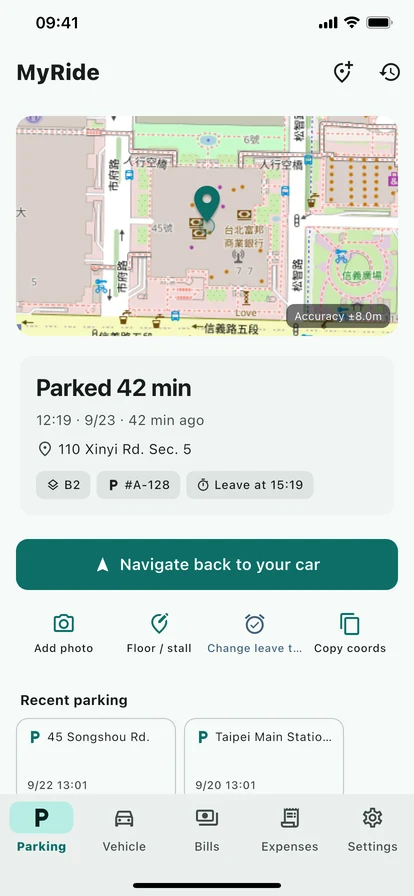
Five tabs
Parking / Vehicle / Payments / Expenses / Settings
Devices
iOS / iPadOS / Android
Navigation
Google Maps / Apple Maps / Waze
Who it is for
Commuters / mall regulars / taxi drivers / multi-car families
Why one app is enough
Finding the car, paying the ticket, servicing the car — three separate chores, kept in three separate places. MyRide puts them on one thread: one car, one screen, with its location, paperwork, fuel economy, service history and running costs all in it.
Indoor garages? Still works.
GPS drifts underground, so MyRide makes "snap the pillar sign" the primary action, not an afterthought. "B2 Red · Pillar J12" plus a GPS fix gets you back even when the coordinates are off by 30 metres.
Nothing quietly goes past due
Parking tickets, fines and taxes each run on their own clock. Log the amount and the deadline, and the app warns you before it lands. MyRide is your record keeper — you still pay through the official channels of whoever issued the bill.
On-device first, location stays put
No accounts, no analytics SDK, no ads. Parking spots, vehicles, paperwork, fuel and service logs all live in SQLite on your phone. Pro backup goes to your own iCloud or Google Drive. We run no backend — we cannot see where you parked.
Parking, payments, fuel and service — all in your pocket
From a one-tap pin to bill deadlines, fuel economy and service reminders, here is how MyRide joins up a driver's week.
Pin your spot in one tap
Hit the big button before you walk away. The app takes one GPS fix, opens the camera for the level sign, and lets you add a note like "B2 Red". On the way back, tap navigate — Google Maps, Apple Maps or Waze, whichever you actually have installed.
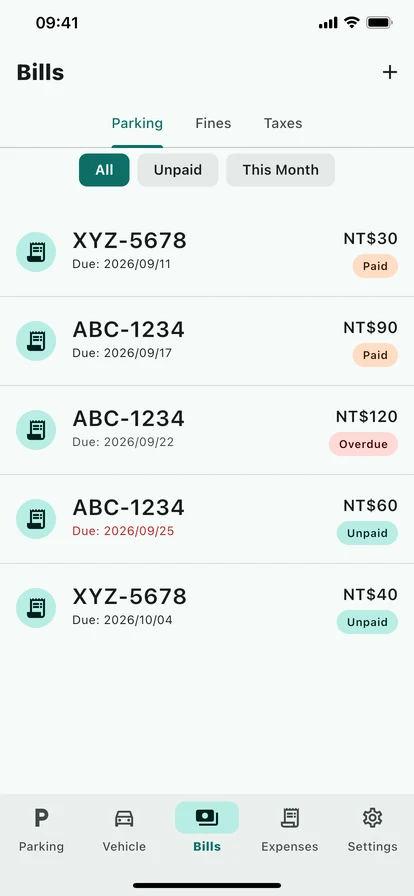
Log the bill, keep the deadline
Add a parking ticket, a fine or a tax with its plate, amount and due date, and the app schedules the reminder. Taxes can repeat monthly or yearly and roll to the next period once you mark them paid.
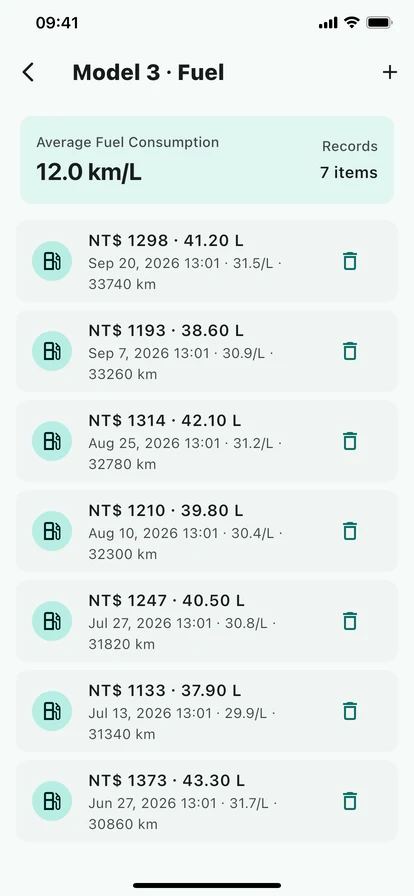
Fuel economy and service reminders
Log the odometer when you fill up and the app works out litres per 100 km and cost per kilometre — fuel logs are unlimited and free. Service reminders fire on distance (oil every 5,000 km) or time (every six months), whichever comes first, as a local notification. The service tab is a Pro feature.
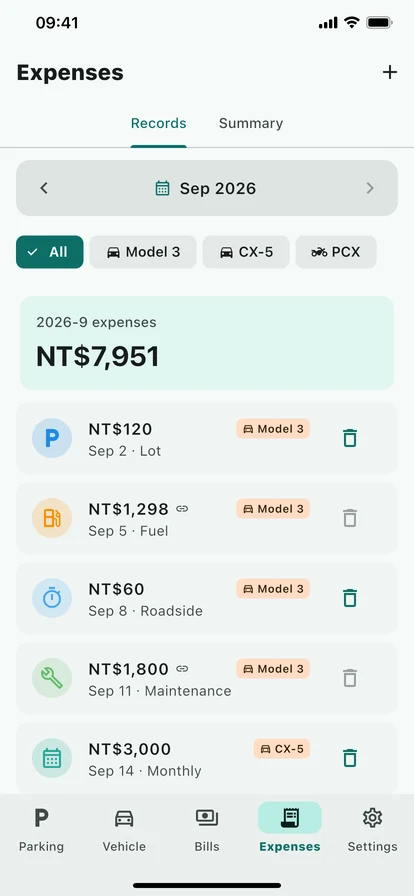
Expenses and a yearly report
Parking, tolls, fuel, servicing, fines and tax, all categorised — 10 entries free, unlimited on Pro. At year end it builds a PDF (monthly fuel economy, spending by category, distance driven) and exports to Excel for your accountant or an expense claim.
From a one-tap pin to a year-end report
Not just a parking note. Location, paperwork, deadlines, fuel, servicing, expenses and backup — it covers the whole week.
- One-tap GPS plus a level photo, so indoor garages stop being a gamble
- Hands off to Google Maps, Apple Maps or Waze — whichever you use
- Parking tickets, fines and taxes tracked separately, with a reminder before each deadline
- The free tier holds 10 parking tickets, 5 fines and 3 taxes; Pro removes the limits
- Taxes that repeat monthly or yearly, with the next period scheduled once you mark one paid
- Every reminder is scheduled on your phone — no account, no server
- Unlimited free fuel logs with automatic economy and cost per kilometre
- Service reminders on distance and date together — oil, tyres, battery (Pro)
- Switch between vehicles, for households or rentals (Pro)
- Analytics and a yearly PDF report, plus Excel export for your accountant (Pro)
- Back up and restore through iCloud or Google Drive when you change phones (Pro)
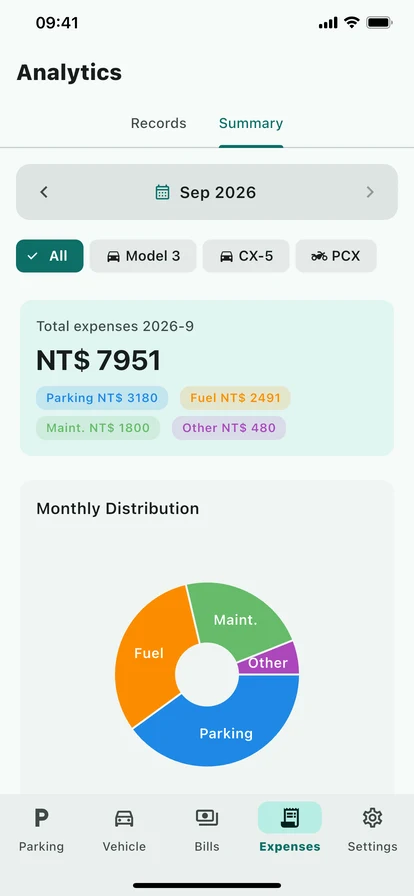
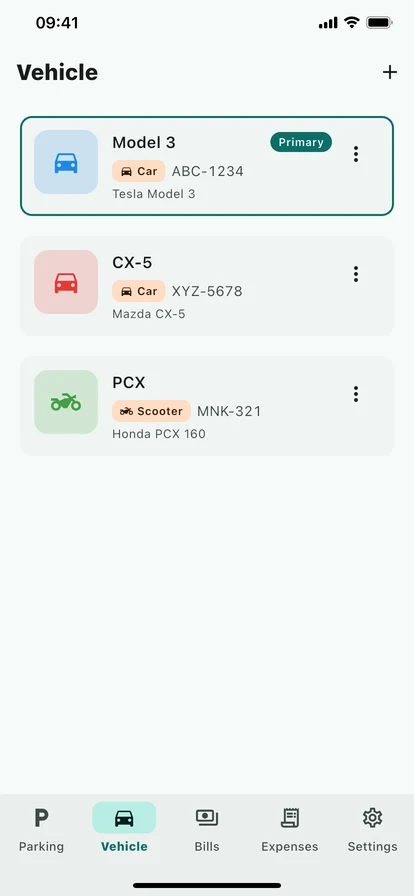
One page cannot hold it all
From the parking spot to the payment queue and the yearly charts — a slower look at how it all fits into one app.
Parking spot
Fuel log
Due soon
Expenses
Analytics
Vehicles
When you will reach for it
Mall regular, daily commuter, taxi driver, or the parent running two or three cars — MyRide has a place in all of it.
Department-store basement
B3 of any major mall, an hour of shopping, legs aching. Tap once on the way in; follow the route on the way out.
Tickets that go past due
The ticket goes in the glovebox and stays there. Log it instead, add the deadline, and let the app warn you before it is overdue.
A fine you will not forget
Log the fine as soon as it arrives. The app keeps the amount and the payment deadline and reminds you before it lapses, so it never turns into a bigger bill.
Taxes that come round every year
Set a yearly tax to repeat. Mark it paid and the next one is scheduled for you — no need to keep it in your calendar.
A household with several cars
His car, her car, grandad's car. Fuel, servicing and tax tracked per vehicle, with a separate report for each at year end.
Taxi and rideshare drivers
Filling up once or twice a day, reconciling economy, service intervals and business mileage at month end. Export to Excel and hand it over.
Why MyRide
More than a parking note — on-device, bought once, and tracking nothing.
On-device first
Parking spots, vehicles, paperwork, fuel, servicing and expenses all sit in SQLite on your phone. No backend of ours, no location upload, no analytics SDK.
NT$90 once. Yours forever.
No subscription, no monthly fee. The free tier keeps the core open — parking pins and fuel logs never expire. Unlock Pro once and keep it.
Nothing to track, nothing to give
No email, no name, no phone number. Map tiles load from OpenStreetMap only while you have the map open, with no identifier attached. We cannot see where you parked.
Common questions
The questions we get most, so you can tell quickly whether MyRide suits you. The full list is on the FAQ page.
No. MyRide has no accounts — open it and start. We do not ask for an email address, a name, a phone number or a date of birth.
No. By default everything sits in SQLite on your phone, photos included. Pro adds a cloud backup that only runs when you press it, into your own iCloud or Google Drive app folder that only you can see. Our servers are never involved.
That is exactly why snapping the pillar sign is the primary action. A photo of "B2 Red · Pillar J12" alongside the GPS fix will still get you back even if the coordinates drift by tens of metres.
Free: unlimited parking pins, unlimited fuel logs, 10 expense entries, 10 parking tickets, 5 fines, 3 tax items, one vehicle and basic stats. Pro is NT$90 once and lifts every one of those limits, and adds the service tab, the analytics tab, multiple vehicles, custom names for parking spots, the yearly PDF report, Excel export and iCloud or Google Drive backup.
It detects them in order: Google Maps, then Apple Maps, then Waze, then the browser as a fallback. Whichever you have installed is the one it uses; iOS defaults to Apple Maps and you can change the preference in settings.
Next time you park, let the app remember where
NT$90 one-time. The free tier keeps the core open — parking pins and fuel logs free forever.